
Camera Ready Instructions
The following steps show the instructions of preparing the camera-ready versions of full research papers, applications papers, industry papers, short papers, tutorial papers,demonstration papers, and student papers. If a submission violates any requirement stated below, the paper may not be published on time.
Attention: All submissions of camera-ready versions must be done through your EasyChair account, to the track corresponding to your submission.
Please send all questions about preparing for the camera-ready versions to the proceedings co-chairs.
- Christine Bassem (cbassem@wellesley.edu)
- Fatme Hachem (fatme.hachem@unimi.it)
- Sara Migliorini (sara.migliorini@univr.it)
- Vishwanath Saragadam (vishwanath.saragadam@ucr.edu)
Step 1. Consider Reviewers' Comments
| Goal | Consider Reviewers' Comments |
|---|---|
| Performing Step | Address Reviewers' Comments |
| Checking Step | - |
Step 2. Use Latest ACM Template
| Goal | Use the latest ACM Template. Note: ACM last template update was on June 28, 2026. |
|---|---|
| Performing Step | Download the latest ACM camera-ready template (http://acm.org/publications/proceedings-template). Please use "sample-sigconf" as a default template. |
| Checking Step | Check whether your submission looks like the sample PDF file (sample-sigspatial.pdf). |
Step 3. Include CCS Concepts and Keywords
| Goal | Include CCS Concepts and Keywords. |
|---|---|
| Performing Step | Include both CCS concepts and keywords in your submission. The information about CCS concepts could be in the link (http://www.acm.org/publications/class-2012). |
| Checking Step | Please check whether the CCS Concepts and Keywords enclosed in a red rectangle in the following picture could be found on the first page of your submission. 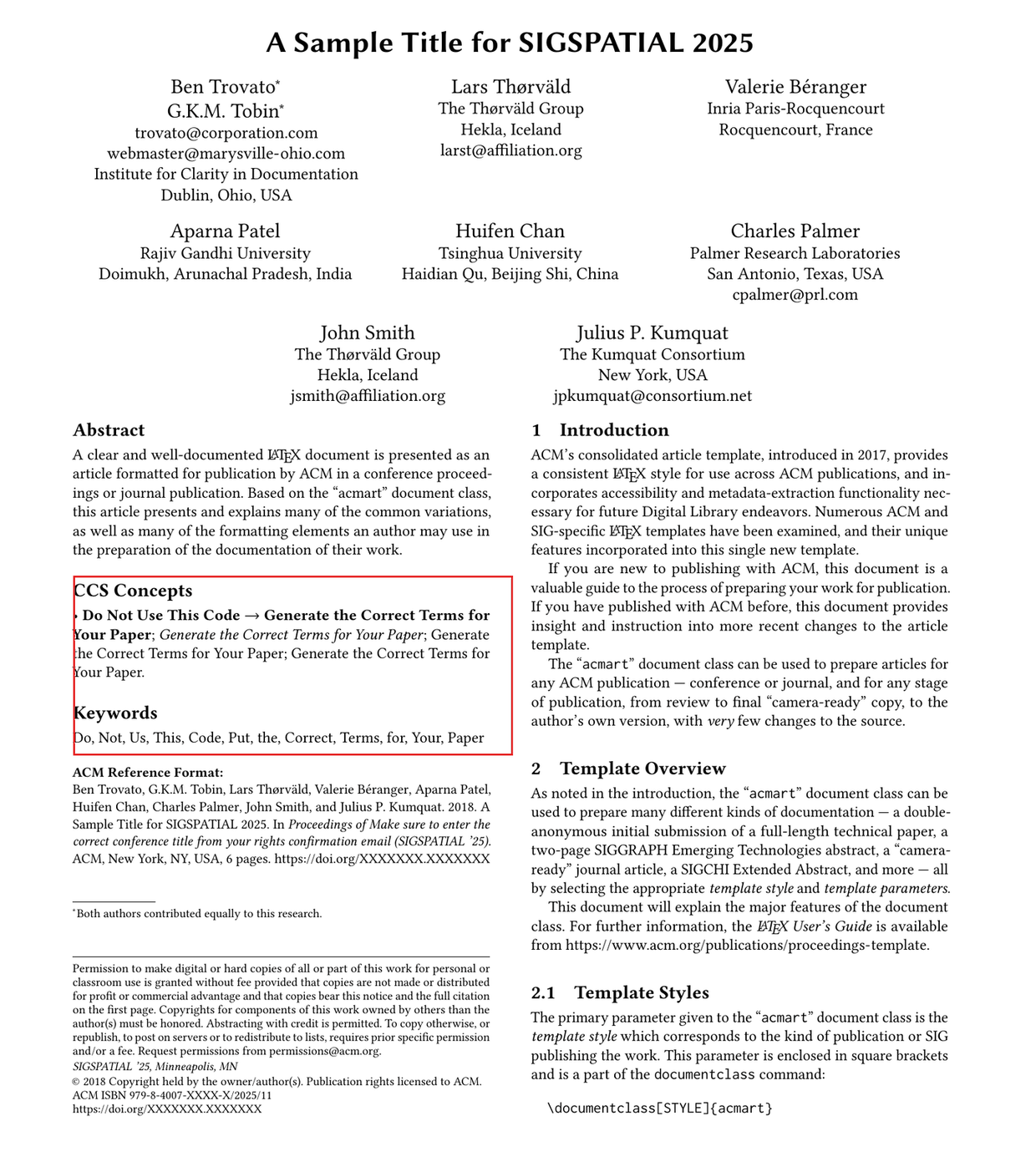 |
Step 4. Check Page Limit
| Goal | Check whether your submission does not exceed the page limit as follows. Full research, industry, and applications papers: 10 pages (excluding references) Short, Demo, Tutorial, Vision, and PhD Workshop papers: 4 pages (including references) SRC Graduate papers 4 pages (including references). SRC undergraduate and TSAS poster papers 2 pages (including references) |
|---|---|
| Performing Step | Check manually |
| Checking Step | There are many ways of checking the total number of pages in your submission (PDF file). In Acrobat Reader, you could see the total number of pages in a PDF file easily. |
Camera-ready full papers are limited to 10 pages, not including references, followed by an unlimited number of pages for references, with up to 2 additional pages to be used as an Appendix. The Appendix should only contain additional information the authors feel would be helpful to justify claims made in the paper, e.g., proofs of Lemmas and Theorems, additional experimental results to further illustrate claims from the experimental results section, etc. The Appendix must be clearly marked as such and should appear at the end of the paper after the references.
Note on ACM Article Processing Charges (APCs)
Starting in 2026, ACM has transitioned to a fully Open Access publishing model. Open Access makes scholarly articles freely available to anyone, anywhere, without subscription barriers, increasing the visibility and impact of research. Under this model, all ACM publications are accessible online at no cost to readers. As a result, authors may have to cover the APC fees (see below). For more details, please visit the ACM Open Access page.
All full papers and short papers are APC-eligible which means that a payment may be needed to cover APC fees. If the corresponding author is affiliated with a participating organization in Open Access agreement, no payment is needed. If none of the authors are in a participating organization, then the corresponding author is responsible for paying APC fees. ACM also provides financial assistance programs, including waivers and discounts, to support the community.
For authors of short papers only, as indicated in the CFP, you may request to reduce your short paper to a three-page poster which makes it non-APC-eligible, and thus no fees are required. If you choose to reduce your paper to a three-page poster, you have to submit a request on this form (https://forms.gle/qfhkE4PvRTA1prqp6) by August 24th. If you would like to keep your short papers as four pages, then no action is needed. Please note that if we do not receive a request by the deadline above, your paper will default to four pages and we will not be able to change that later and the authors will be responsible for any APC applicable fees.
Step 5. Exclude Page Number
| Goal | Do NOT include any page number in your submission. |
|---|---|
| Performing Step | Check manually |
| Checking Step | At the bottom of each page, please make sure that there is no page number. |
Step 6. Use PDF file for Camera-ready Submission
| Goal | Use the PDF file format. |
|---|---|
| Performing Step | Use some standard tools (e.g., Acrobat) to generate the PDF file. |
| Checking Step | Check whether your submission could be opened by Acrobat Reader. |
Step 7. Use US Letter Size (not A4 Size)
| Goal | Use US letter (not A4 size) as the page size of your submission (PDF file). Note: The dimension of the US letter is "8.5 x 11 in". |
|---|---|
| Performing Step | This step could be done easily in US and Canada since the default page size is US Letter. In most other countries, usually, the default page size is A4. There are many ways of generating a PDF file with the US letter size. One possible way is: Step 1: Open your PDF file in Adobe Acrobat. Step 2: Click on "File," and select "Print Setup." Step 3: Select "Letter" from the drop-down menu for "Size" under the "Paper" section. Step 4: Click "OK." Step 5: Click "File" and select "Print." Click on the drop-down menu for "Page Scaling," and select "Fit to Printable Area." Click "OK." |
| Checking Step | You could check the page size in Acrobat Reader with the following steps. ---------------------------------------------- Step 1: "File" --> "Properties" Step 2: After that, you could see a dialog box. In the "Description" tag, you could see there is a field called "Page Size" near to the bottom. Step 3: Check whether the content of this field is "8.5 x 11 in". If yes, this is a US letter size. Otherwise, no. Note that the page size of A4 is "8.3 x 11.7 in". ---------------------------------------------- |
Step 8. Embed All Fonts
| Goal | Please embed all fonts in your submission (PDF file). |
|---|---|
| Performing Step | The following shows the instructions. Word: http://www.acm.org/binaries/content/assets/publications/word-to-pdf-instructions-.txt Latex: http://xiaohui-blog.blogspot.com/2012/04/fixing-font-not-embedded-issue-to-pass.html |
| Checking Step | You could check whether all fonts are embedded in Acrobat Reader with the following steps. ---------------------------------------------- Step 1: "File" --> "Properties" Step 2: After that, you could see a dialog box. In the "Fonts" tag, check whether each font listed should have "(Embedded)" or "(Embedded Subset)" next to the font name. If yes, all fonts are embedded. Otherwise, no. ---------------------------------------------- |
Step 9. Include Correct Copyright block
| Goal | Include the ACM copyright block |
|---|---|
| Performing Step | Step 1: Wait for an email from ACM with the information about how to fill in and submit a copyright release form within the few weeks after the author notification date. (If the first author does not receive any email from ACM within two weeks after the author notification date, please contact the proceedings co-chairs.) Step 2: Fill in and submit the copyright form. You will receive an email from ACM in response of the submitted copyright release form. Step 3: Include the ACM copyright block from this copyright form email |
| Checking Step | Please check whether the ACM copyright block enclosed in a red rectangle in the following picture could be found on the first page of your submission. Note: Different papers have different DOIs enclosed in a blue rectangle. The DOI of one paper should not be re-used for another paper. Note: The following shows an example of a copyright block which appears at the bottom-left of the first page. The DOI in the last line could be obtained from the ACM email. \================================ SIGSPATIAL ’24, October 29 - November 1, 2025, Atlanta, GA, USA © 2025 Association for Computing Machinery. ACM ISBN 979-8-4007-1107-7/24/10. . . $15.00 https://doi.org/10.1145/1122445.1122456 (replace with your own DOI) \================================ 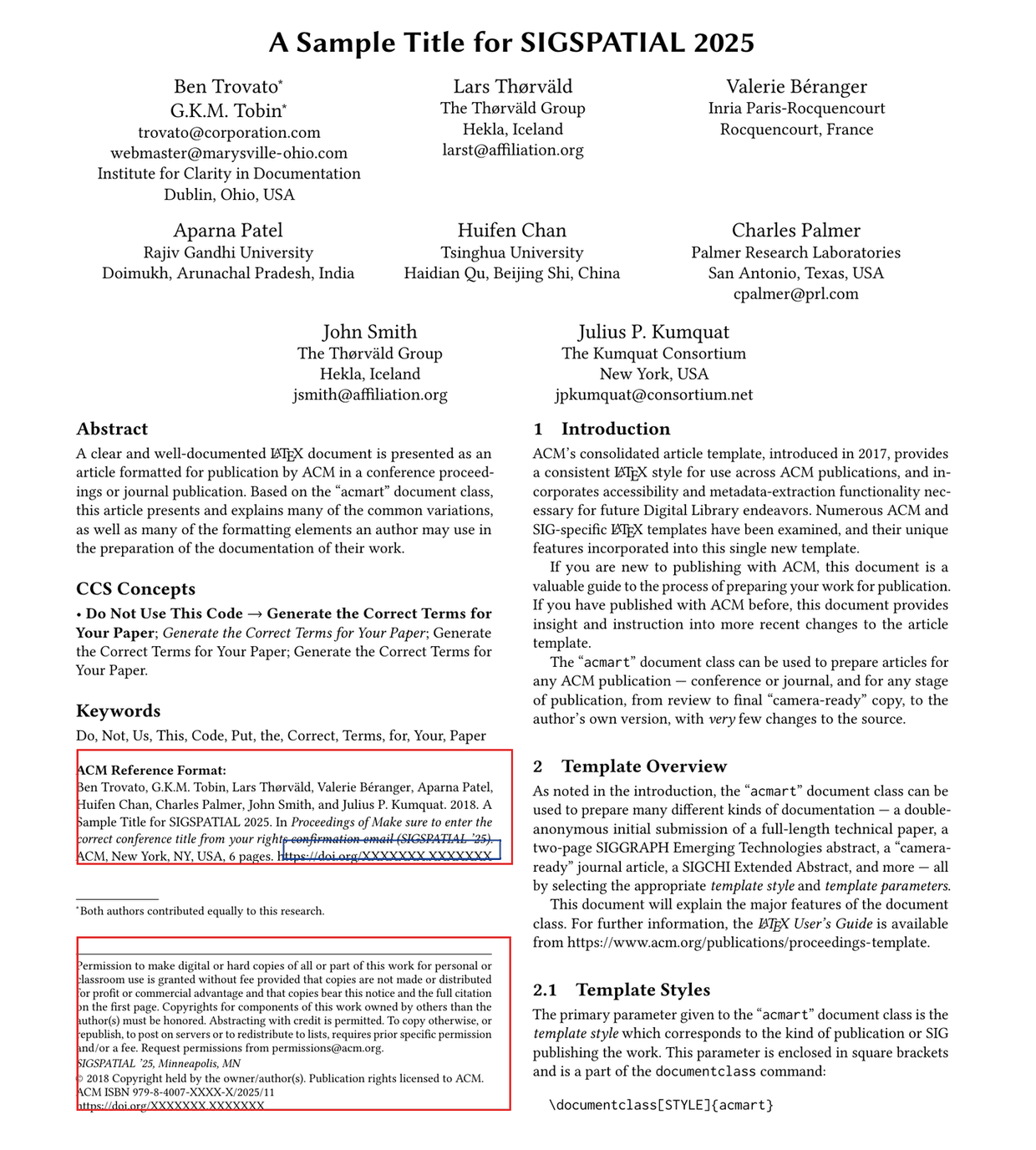 |
Step 10. Submit Camera-Ready Version
After you finish the above steps, submit your camera-ready paper no later than September 1st using your track’s EasyChair account (E.g. research track: https://easychair.org/conferences/?conf=acmsigspatial2026, proceedings author (* Papers)).
For tutorials and TSAS posters, please upload your camera-ready paper to the link below: https://univr-my.sharepoint.com/:f:/g/personal/sara_migliorini_univr_it/IgAnenHEOsb4TaTDIFgGrWgCAZ2Wf3GMcUMt1NH62YL2VjU?e=cfD8jb
Step 11. Register for a Conference
At least one author of each submission must register for the conference